1.Java 报错汇总
报错:java.lang.IllegalArgumentException: Unsupported class file major version 64
问题分析: 这个错误意思大概就是:非法参数异常,不支持的类文件主版本64。
猜想应该是版本兼容问题,查找项目中只集成了spring-context,版本是5.2.21.RELEASE,而jdk版本是20。
目前spring-context版本5.2.21.RELEASE并不是最新版本,而jdk版本20是比较新的版本,那么要想解决该问题应该是要么降低jdk版本,要么升高spring-context版本。
**解決方案:**在idea中降低模塊jdk版本,將下圖的target bytecode version從20改成8(即jdk1.8)
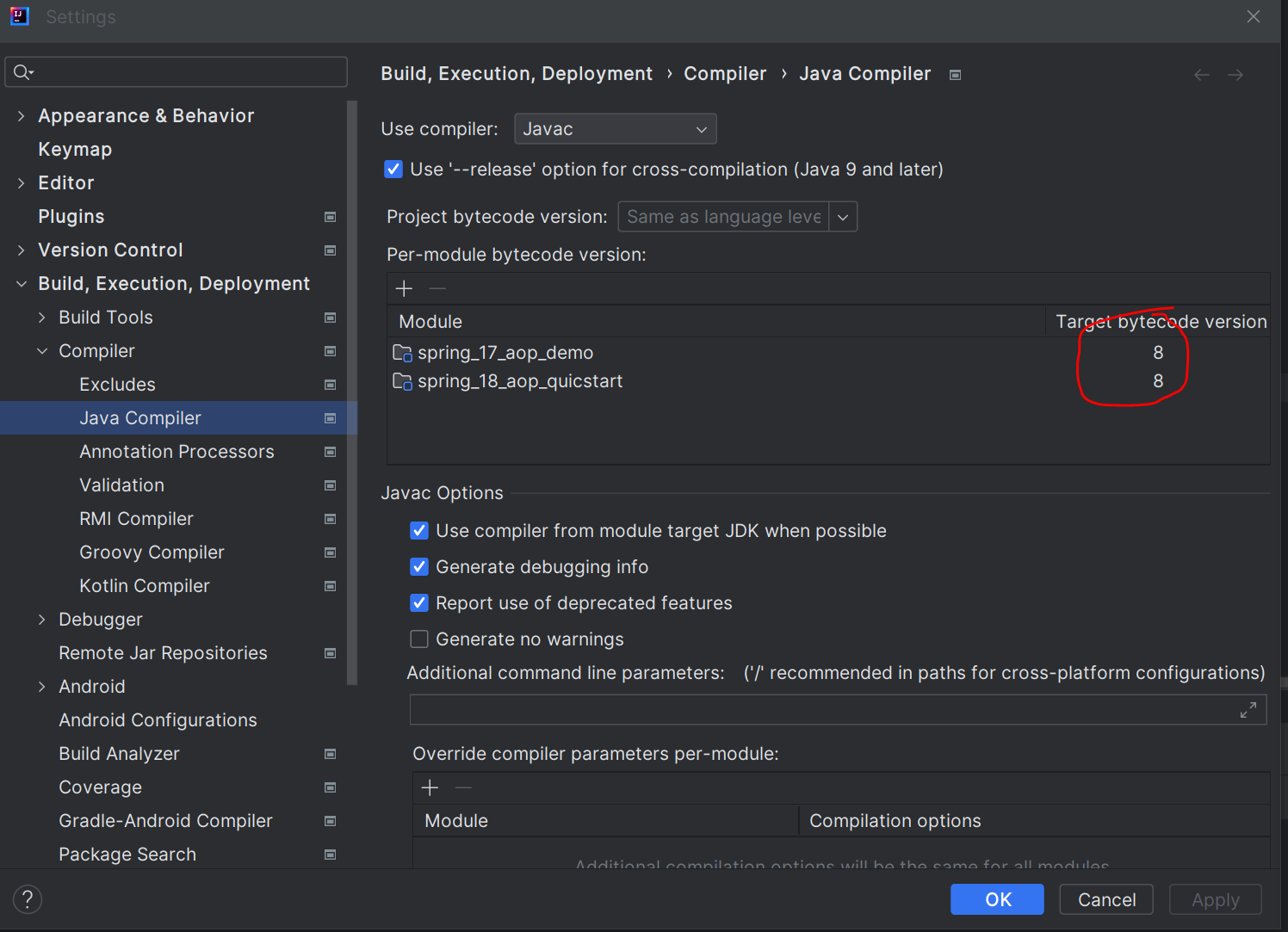
降低JDK版本或升級spring版本均可解決問題
參考鏈接: https://blog.csdn.net/qq_39653385/article/details/129483221
報錯:No goals have been specified for this build. You must specify a valid lifecycle phase
解決方案: pom.xml 文件中 <build> 标签要加配置: <defaultGoal>compile </defaultGoal>
    <build>
        <defaultGoal>
            compile
        </defaultGoal>
    </build>
參考鏈接: https://blog.csdn.net/jiangyu1013/article/details/86510112
報錯:No qualifying bean of type ....
解決方案:
1 检查是否添加了对应注解
2 检查配置是否正确,扫描包名, 类名及id是否正确
參考鏈接: https://blog.csdn.net/u010565545/article/details/100066824
報錯:Please refer to dump files (if any exist) [date].dump, [date]-jvmRun[N].dump and [date].dumpstream.
解決方案: You can try this: Add this code in the plugins section of your pom.xml
<plugin>
    <groupId>org.apache.maven.plugins</groupId>
    <artifactId>maven-surefire-plugin</artifactId>
    <version>2.22.2</version>
    <configuration>
    <skipTests>true</skipTests>
    </configuration>
</plugin>
報錯:org.springframework.boot.context.config.InvalidConfigDataPropertyException: Property 'spring.profiles' imported from location 'class path resource [application.yml]' is invalid and should be replaced with 'spring.config.activate.on-profile'
解決方案: application.yml文件的格式書寫有問題,改成以下格式
spring:
  profiles:
    active: dev   #激活使用的環境
---
server:
  port: 8001
spring:
  config:
    activate:
      on-profile: dev
---

server:
  port: 8002
spring:
  config:
    activate:
      on-profile: pro
參考鏈接: What is diff between spring.profiles.active vs spring.config.activate.on-profile? - Stack Overflow
報錯: Consider renaming one of the beans or enabling overriding by setting spring.main.allow-bean-definition-overriding=true
**解決方案:**在application.yml或application.properties中添加以下内容
#application.yml
spring:
  main:
    allow-bean-definition-overriding: true
#application.properties
spring.main.allow-bean-definition-overriding=true
報錯:[ERROR] 'mirrors.mirror.mirrorOf' for official is missing
解決方案: 添加下面的鏡像
<mirror>
  <id>alimaven</id>
  <mirrorOf>central</mirrorOf>
  <name>aliyun maven</name>
  <url>http://maven.aliyun.com/nexus/content/repositories/central/</url>
</mirror>

<mirror>
    <id>alimaven</id>
    <name>aliyun maven</name>
    <url>http://maven.aliyun.com/nexus/content/groups/public/</url>
    <mirrorOf>central</mirrorOf>
</mirror>

<mirror>
    <id>central</id>
    <name>Maven Repository Switchboard</name>
    <url>http://repo1.maven.org/maven2/</url>
    <mirrorOf>central</mirrorOf>
</mirror>

<mirror>
    <id>repo2</id>
    <mirrorOf>central</mirrorOf>
    <name>Human Readable Name for this Mirror.</name>
    <url>http://repo2.maven.org/maven2/</url>
</mirror>

<mirror>
    <id>ibiblio</id>
    <mirrorOf>central</mirrorOf>
    <name>Human Readable Name for this Mirror.</name>
    <url>http://mirrors.ibiblio.org/pub/mirrors/maven2/</url>
</mirror>

<mirror>
    <id>jboss-public-repository-group</id>
    <mirrorOf>central</mirrorOf>
    <name>JBoss Public Repository Group</name>
    <url>http://repository.jboss.org/nexus/content/groups/public</url>
</mirror>

<!-- 中央仓库在中国的镜像 -->
<mirror>
    <id>maven.net.cn</id>
    <name>oneof the central mirrors in china</name>
    <url>http://maven.net.cn/content/groups/public/</url>
    <mirrorOf>central</mirrorOf>
</mirror>
參考 :https://blog.csdn.net/qq_45822970/article/details/125128359
报错:使用idea打开新项目后,项目文件全部是灰色
解决方案: pom.xml文件不小心被移动到src文件夹了,移动到pom.xml后,idea能够正常识别项目了。
下面参考链接中有其他解决方案
参考: https://blog.csdn.net/lillanm/article/details/124070060
報錯:idea打开springboot项目后,无法直接run,运行按钮是灰色
解决方案: 新增一个配置文件,配置文件选maven,在配置文件的Command line中使用以下配置:
spring-boot:run
如果working directory不是项目目录的话,需要更改到项目目录。
参考: https://blog.csdn.net/Y12nre/article/details/60869829
報錯:Caused by: java.lang.ClassNotFoundException: com.alibaba.fastjson2.modules.ObjectReaderModule
解決方案: fastjson版本有問題,更改依賴版本試試
報錯:java 程序包org.junit.jupiter.api不存在
解決方案: 添加依赖即可
		<dependency>
			<groupId>org.junit.jupiter</groupId>
			<artifactId>junit-jupiter-api</artifactId>
			<version>5.9.2</version>
			<scope>test</scope>
		</dependency>
參考: https://blog.csdn.net/qq_22498427/article/details/117981105
报错:Mybatis - Invalid bound statement (not found)
解决方案:检查Resources中xxxmapper.xml文件是否存在或者xxxmapper.xml是否错误移动到其他文件夹
参考:https://stackoverflow.com/questions/55000770/mybatis-invalid-bound-statement-not-found
报错:找不到或无法加载主类 com.ruoyi.RuoYiApplication
解决方案:重新mvn install 即可
参考:https://www.cnblogs.com/wwssgg/p/16352561.html
https://blog.csdn.net/huangbaokang/article/details/106506828
报错:若依新增模块后接口报错404
解决方案:若依新增模块后需要操作以下两步骤:
-
在新模块pom中引用ruoyi-common
        </dependency>
        <dependency>
            <groupId>com.ruoyi</groupId>
            <artifactId>ruoyi-common</artifactId>
</dependency> -
将新模块添加至admin包的pom,且必须添加版本号,否则依赖不成功
        <dependency>
            <groupId>com.ruoyi.oa</groupId>
            <artifactId>ruoyi-oa</artifactId>
            <version>3.8.7</version>
        </dependency>
参考:https://blog.csdn.net/baidu_16250655/article/details/135676107